Physical Address
304 North Cardinal St.
Dorchester Center, MA 02124
Physical Address
304 North Cardinal St.
Dorchester Center, MA 02124

A power outage is harder to manage in an apartment because residents usually cannot install a standby system or operate a fuel-powered generator near the building. Storage space is limited, balconies may receive little direct sunlight, and shared entrances or elevators can stop working.
A useful plan does not try to keep every appliance running. It identifies the few services that matter most, calculates their energy needs, and prepares a safe way to supply them until power returns or it becomes necessary to leave.
Start by checking your lease, building rules, and emergency procedures. Find out whether emergency lighting, water pumps, elevators, entry systems, and common-area outlets remain available during an outage. Ask management how residents who use mobility aids or powered medical equipment should respond if an elevator or building system stops.
Do not plan to operate a gasoline, propane, or diesel generator on a balcony, in a hallway, or near an open window. Combustion equipment produces carbon monoxide, and exhaust can enter your apartment or a neighboring unit. A battery power source avoids combustion fumes during operation, but it still must be stored, charged, and used according to the manufacturer’s instructions.
For most apartment residents, the first priorities are communication, light, airflow, and essential work or medical devices. That may mean a phone, modem and router, laptop, a few LED lights, and a fan. A television, game console, coffee maker, electric kettle, space heater, portable air conditioner, and hot plate belong in a different category because they can consume hundreds or thousands of watts.
This distinction matters more than the number of outlets on the battery. A 1,500-watt heater running for one hour uses 1,500 watt-hours. By comparison, a 12-watt router running for eight hours uses 96 watt-hours. Using stored electricity for heat can therefore consume a substantial battery in a short period, while the same energy could keep communications and lighting available much longer.
Power and energy answer different questions. Watts show how much power a device needs at a given moment. Watt-hours show how much energy it uses over time. Estimate each device with this calculation:
Energy required (Wh) = device power (W) x operating time (hours)
Suppose an outage plan includes a 12-watt router for eight hours, a 60-watt laptop for three hours, an 8-watt LED lamp for six hours, and a 35-watt fan for eight hours. Their estimated use is 96Wh, 180Wh, 48Wh, and 280Wh, for a total of 604Wh.
The number on an appliance label may show maximum input rather than typical consumption. A plug-in electricity meter can measure what a device actually uses over several hours. The battery should also have more capacity than the calculation alone suggests because the inverter, internal electronics, and power conversion consume energy. Low temperatures and battery condition can reduce available runtime further.
Capacity and output should be evaluated separately. Capacity, expressed in watt-hours or kilowatt-hours, determines how long the selected loads can run. Continuous AC output, expressed in watts, determines whether the battery can operate those loads at the same time. Some motors and compressors also require a brief startup surge above their normal running power.
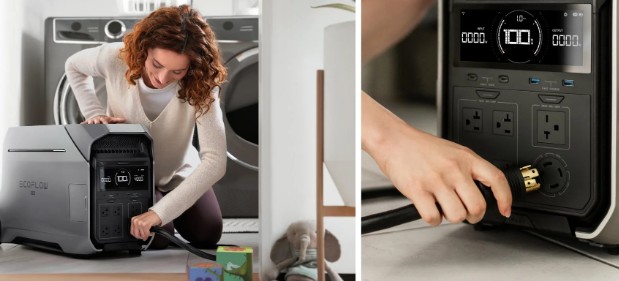
The EcoFlow power station collection shows how widely these specifications can vary. Compact models begin around 245Wh with 300W output, while mid-sized options offer about 1kWh with 1,800W output, and larger systems provide several kilowatt-hours. For an apartment, the right point in that range depends on measured essential loads and the expected outage duration, not simply on buying the unit with the highest output.
A resident who only needs a router, phones, lights, and a laptop may benefit more from a compact unit that is easy to store and carry. Someone who must run a fan through a hot night, support powered medical equipment, or prepare for a full day without electricity will need more stored energy. Medical devices should be checked against their manufacturer requirements, and the battery system should not be the only emergency plan.
Charge the unit before severe weather when advance warning is available, but follow the manufacturer’s storage and charging guidance rather than leaving an unsupported device connected indefinitely. Keep the original charger accessible and label any cables or adapters that are easy to confuse in the dark.
Solar charging can extend an outage plan, but only when a balcony, terrace, or other permitted area receives useful direct sunlight. Panel wattage is a rated maximum, not a promise of daily production. Shade from neighboring buildings, window glass, panel angle, clouds, and limited daylight can reduce the energy collected. Do not assume a small panel will fully replace a full day of consumption without comparing expected solar input with the daily watt-hour budget.
Vehicle charging may provide another option if the power station supports it. The vehicle must be operated outdoors, never in an enclosed or attached garage. Apartment residents should also consider whether they can safely reach the parking area, carry the battery, and return before relying on this method.
Choose a dry, room-temperature location away from heaters, direct sunlight, exits, and materials that burn easily. Leave the ventilation openings clear during charging and operation. Use the supplied or manufacturer-approved charging equipment, and avoid connecting the charger through an overloaded outlet, extension cord, or stack of plug adapters.
Stop using the unit if it develops unusual heat, swelling, odor, leaking, discoloration, or abnormal sounds. Do not attempt to open or repair a battery pack yourself. A power station should also remain above any area that could flood from a leaking pipe, sprinkler activation, or stormwater entering a ground-floor apartment.
A plan based only on labels is incomplete. Fully charge the system, disconnect it from wall power, and run the exact devices intended for an outage. Check whether the router restarts, whether the fan operates at the planned setting, and how much battery remains after two or three hours. Extrapolate cautiously because loads such as laptops and fans may change their power use during operation.
The test also reveals practical problems: a missing cable, an outlet that is hard to reach, a display that is too bright at night, or a battery that is too heavy for one person to move. Repeat the test periodically, especially before storm or wildfire seasons, and recharge the system afterward according to its manual.
Portable battery power can preserve communication, lighting, and basic comfort, but it cannot make every apartment safe during a prolonged outage. If indoor temperatures become dangerous, a powered medical device cannot be supported reliably, water service fails, or officials order an evacuation, move to a designated cooling center, warming center, shelter, or another safe location. When extreme heat causes cooling equipment to fail completely during high summer demand, having access to local specialists who can restore airflow quickly becomes essential for maintaining safe living conditions. Residents facing severe cooling breakdowns during hot weather often rely on [Peachy Keen emergency air conditioning services](https://
The strongest apartment outage plan is built around realistic loads and clear limits. By measuring essential devices, reserving energy for the services that matter most, and testing the setup in advance, residents can gain useful backup time without depending on a fuel-powered generator.