Florida eFiling Portal is a robust online platform designed to simplify the filing of court documents across Florida’s 67 counties.
Launched in 2010, this system has transformed how attorneys, self-represented litigants, and other stakeholders interact with the state’s judicial system, connecting over 220,000 self-represented litigants, 82,000 attorneys, and 1,400 judges.
By enabling electronic submissions, payments, and case tracking, it eliminates the need for physical visits to courthouses, saving users an estimated $38 million in postage and courier costs.
Understanding the Florida eFiling Portal
The Florida eFiling Portal, also known as myflcourtaccess, serves as a centralized hub for submitting court documents across all Florida counties.
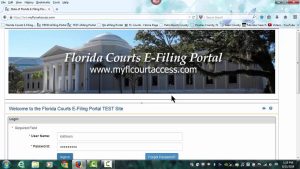
Mandated by the Florida Legislature and the eFiling Authority, it ensures seamless access for users, from attorneys to pro se litigants.
The platform supports a variety of case types, including circuit civil, county civil, family, probate, and juvenile dependency, with tailored rules for each division.
Key Features of the Portal:
- Unified Access: A single set of login credentials works statewide.
- Document Uploads: Files must be submitted in PDF/A format for archiving.
- Secure Payments: Pay court fees and minimal processing fees online.
- Real-Time Updates: Receive email notifications on filing statuses.
- Remote Filing: Submit documents from any location with internet access.
The portal’s intuitive design caters to both experienced legal professionals and first-time filers, making it a cornerstone of Florida’s judicial modernization.
Registering for the Florida eFiling Portal
Florida eFiling Portal registration is free and tailored to different user groups, including attorneys, law firms, self-represented litigants, and law enforcement agencies. The process is streamlined to ensure quick access while maintaining security.
Registration for Attorneys
- Verify Credentials: Attorneys must provide their Florida Bar Identification Number and name as registered with the Florida Bar. The system validates these details.
- Online Sign-Up: Access the portal’s registration page, enter personal details, and create a username and password.
- Law Firm Setup: Firms designate an Account Administrator and submit the ePortal Law Firm Registration Form to the relevant county clerk, such as Broward County’s dedicated email.
- Pro Hac Vice: Non-Florida attorneys must comply with Florida Bar rules for limited appearances, which may involve additional fees.
Registration for Self-Represented Litigants
- Optional Use: Since June 21, 2014, self-represented litigants can choose to file electronically for convenience.
- Simple Process: Register with basic personal information—no Florida Bar credentials required.
- Guidance Available: A detailed user manual assists pro se filers in navigating the portal.
Registration for Law Enforcement
- Notarized Form: Complete the Clerk of the Court and Comptroller ePortal Law Enforcement Administrator Request Form, which requires notarization.
- Submission: Mail the form to the appropriate Clerk of the Court and Comptroller for approval.
Upon registration, users receive login credentials via email. Multiple accounts are permitted for handling fee-exempt and fee-based filings, with additional accounts processed through the support desk.
Logging into the Florida eFiling Portal
The Florida eFiling Portal login process is secure and user-friendly, providing access to a personalized dashboard for case management.
Login Steps
- Access the Portal: Navigate to the myflcourtaccess login page.
- Enter Credentials: Input your registered username and password.
- Security Measures: Some accounts may require two-factor authentication for added protection.
- Dashboard Access: View My Cases, My Submissions, and My Alerts upon successful login.
If login issues arise, contact the support desk at 850-577-4609 or via email. Common problems, such as incorrect Florida Bar details or forgotten passwords, can be resolved using the portal’s password recovery feature.
Filing Documents Through the Florida eFiling Portal

Florida court document submission online is mandatory for attorneys in most case types since April 1, 2013, while self-represented litigants have the option to file electronically. The process is designed for accuracy and efficiency.
Steps to File Documents
- Prepare Files: Convert documents to PDF/A format, as required by the Florida Supreme Court for long-term archiving.
- Redact Sensitive Data: Per Florida Rule of Judicial Administration 2.420, remove personal information like Social Security numbers or bank details. File a Notice of Confidential Information separately if needed.
- Upload Documents: Log in, select the case (or create a new one), and upload files. Specify the case type and sub-type for new cases.
- Pay Fees: Enter payment details for statutory fees and minimal processing fees. Fee waivers are available under Florida Statutes § 28.345 for eligible users.
- Submit and Review: Verify document accuracy before submission.
Post-Filing Process
- Clerk Review: The Clerk of the Court reviews submissions and either accepts or pends them for corrections within 5 days.
- Notifications: Email alerts detail filing status, accessible via My Alerts and My Submissions.
- Corrections: Pended filings include reason codes. Consult the Florida Courts E-Filer User Manual (page 126) for correction guidance.
Certain filings, such as emergency motions or juvenile summons, may require manual submission due to immediate judicial needs or county-specific rules.
Searching Cases in the Florida eFiling Portal
Florida eFiling case search enables users to track case progress, but access to official court files is limited to counsel of record.
How to Search Cases
- Navigate to My Cases: From the dashboard, select the case number to view details.
- Review Docket: Click Case Style/Docket to access filings, rulings, and case updates.
- Public Search: For non-counsel cases, use county clerk websites for Florida court case search by name or case number.
Restrictions
- Limited Access: Only counsel of record can view official files through the portal.
- County Tools: Most counties offer public search options via their case maintenance systems, such as courtmap in Miami-Dade County.
For complex cases, such as those in the Complex Business & Tort Division, filers must submit a Notice of Intent per Administrative Order 2013-11-Civ alongside new case filings.
Service of Process in the Florida eFiling Portal
Florida eFiling service of process ensures court documents reach the appropriate parties electronically or manually, following strict guidelines.
eService Protocols
- Subject Line: Use the format “SERVICE OF COURT DOCUMENT Case No.” followed by the case number, style, document title, and contact details.
- File Size: eServed documents must be under 5 MB.
- Certificate of Service: Include a certificate listing served attorneys’ names, firms, and contact information for documents filed after the initial complaint.
- Exemptions: Serve exempt attorneys or pro se parties without email via hand delivery, U.S. mail, or fax.
Summons Handling
- 20-Day Summons: File through the portal for circuit civil, county civil, family, and probate cases. These are docketed but not executed.
- Manual Summons: 5-day, pre-trial, or juvenile summons require manual submission to the court division.
- Process Servers: Filers must provide copies to their chosen process server, as the portal does not forward documents.
For multi-signature documents, include a signature block for each signer, using “/s/” for electronic signatures with consent.
Florida eFiling for Attorneys: Compliance and Best Practices
Florida eFiling for attorneys is mandatory for most case types, with specific protocols to ensure compliance.
Mandatory Filing Timeline
- Civil Cases: Required since April 1, 2013.
- Juvenile and Adoptions: Mandatory since January 6, 2014.
- Supreme Court: Per Rule 2.525 and Administrative Order AOSC13-7.
Document Requirements
- Signatures: Use handwritten, “/s/” electronic, or scanned notarized signatures for sworn documents.
- Exhibits: Label as Exhibit A, Exhibit B, etc., with clear slip-sheets or stickers.
- Courtesy Copies: Some judges require printed copies with tabbed exhibits for hearings.
Emergency Filings
- Probate/Mental Health: E-file emergency motions and provide the filing reference number to the department.
- Civil/Family: Submit emergency motions manually if immediate judicial action is required.
Attorneys can use the eCourtesy feature to submit proposed orders, streamlining judicial processes.
Support Resources for the Florida eFiling Portal
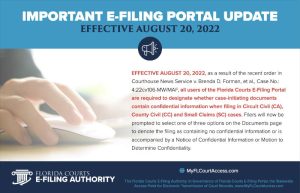
Florida eFiling portal support provides comprehensive assistance to ensure smooth operation for all users.
Support Channels
- Help Desk: Reach out at 850-577-4609 or via email for technical support.
- User Manuals: Access the Florida Courts E-Filer User Manual for detailed instructions.
- Training Videos: Watch tutorials on registration, filing, and troubleshooting.
- Contact Form: Submit inquiries for personalized assistance.
Additional Tools
- Florida Bar Resources: Offers e-filing guides and videos.
- County Clerk Websites: Provide local rules and public search tools.
- Maintenance Alerts: The portal announces downtime (e.g., 3-4 hours) via email or its homepage.
FAQs About the Florida eFiling Portal
Who is eligible to use the Florida eFiling Portal?
Attorneys, self-represented litigants, law enforcement, and authorized organizations can register. Attorneys need Florida Bar credentials, while pro se users need only personal details.
Are there fees for using the portal?
Registration and filing are free, but statutory fees and minimal processing fees apply. Fee waivers are available under Florida Statutes § 28.345.
Can criminal cases be filed electronically?
Electronic filing for criminal cases varies by county. Verify with the local clerk.
What happens if a filing is pended?
Correct pended filings within 5 days using the Correction Queue and reason codes.
How are summons fees handled?
Enter the number of defendants in the Additional Fees section to calculate summons fees automatically.
Can I have multiple accounts?
Yes, for fee-exempt and fee-based filings. Additional accounts are managed by the support desk.
How do I remove myself from an eService list?
Go to My Cases, select the case, click the red X next to your name, and confirm removal.
Conclusion of Florida eFiling Portal
The Florida eFiling Portal revolutionizes court document submission by offering a centralized, efficient, and accessible platform.
From registration to case searches, filings, and service of process, it empowers users to manage legal tasks seamlessly.
By leveraging its features and support resources, attorneys and self-represented litigants can navigate Florida’s judicial system with confidence, saving time and resources while ensuring compliance.