Physical Address
304 North Cardinal St.
Dorchester Center, MA 02124
Physical Address
304 North Cardinal St.
Dorchester Center, MA 02124

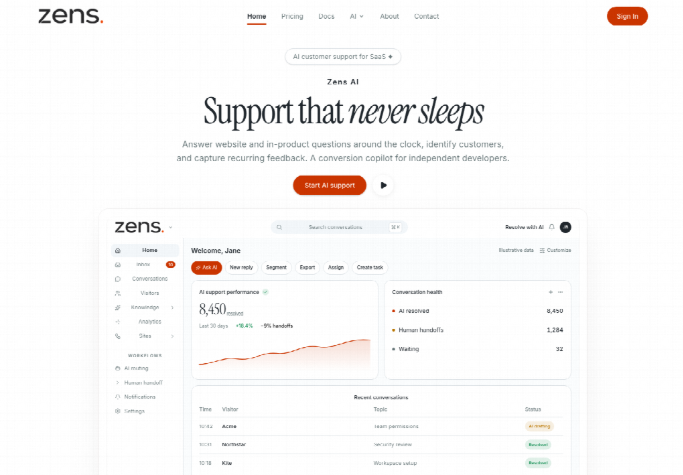
Content platforms and membership portals frequently lose high-intent subscribers because support widgets run disconnected from user logins. Zens is releasing its official WordPress plugin on WordPress.org, allowing site administrators to deploy identity-aware AI customer support across content sites, eCommerce stores, and digital communities without editing PHP theme files or writing custom JavaScript.
Turnkey integration removes the friction of custom webhook development and manual script tag embedding. Instead of pasting generic tracking tags that treat registered members as anonymous strangers, the new plugin automatically maps WordPress user roles, subscriber tiers, and billing states to the support inbox, enabling accurate assistance from the first question.
Publishers and digital storefronts relying on legacy live-chat plugins routinely encounter friction when registered members request account-specific assistance. When an active subscriber asks about recurring subscription access or digital download permissions, basic widgets treat the user as a first-time visitor. The customer must manually type their account email, describe their active tier, and wait for a support operator to locate their profile in an external billing system.
This fragmented workflow wastes valuable response time and degrades user satisfaction. Customer support agents frequently generate inaccurate answers because the AI assistant lacks visibility into the visitor active subscription status. An automated response might suggest buying a membership plan that the user already purchased three months earlier, creating frustration and eroding brand trust across critical conversion funnels.
Designers usually notice this breakdown during major campaign launches when subscriber inquiries surge. The first version of an automated support reply looked fine until a reviewer opened the customer profile and could not defend the contradictory advice given to a long-term enterprise subscriber. That rework is a sprint slot that drains editorial focus, and that single miss can prompt a dissatisfied customer to cancel their membership.
Zens AI eliminates this blind spot by bridging native WordPress user sessions with a centralized support workspace. By automatically synchronizing verified identity metadata, the plugin ensures that every AI draft reflects accurate customer context from the moment a conversation begins.
Setting up the integration follows standard WordPress administrative conventions, requiring no server-side modifications or code deployments. Administrators can complete the entire activation sequence within minutes through their existing WordPress dashboard.
Site owners navigate to the Plugins section, search for the official extension, and initiate installation with a single click. The plugin architecture relies entirely on native WordPress hooks and REST API endpoints, ensuring compatibility with modern block themes, page builders, and performance optimization plugins.
After activating the extension from the directory, the WordPress administration menu gains a dedicated configuration screen. This centralized settings page allows site managers to toggle widget visibility across public articles, membership portals, and administrative views, ensuring complete control over where customer interactions appear.
Once activated, the plugin prompts the administrator to connect their workspace by entering their unique Site ID and signing secret generated within the administration console. This cryptographic handshake establishes a secure, encrypted communication channel between the WordPress installation and the AI customer support infrastructure.
The integration automatically discovers registered user attributes and prepares them for contextual support handoffs. Administrators maintain granular authority over which fields are synchronized, ensuring that sensitive personal data remains protected while giving support workflows the context necessary for accurate issue resolution.
The plugin automatically captures core WordPress identity properties, including display names, registered email addresses, and assigned user roles such as Subscriber, Editor, or Administrator. For sites utilizing membership extensions or WooCommerce, the plugin identifies active customer statuses and transaction counts.
In our desk testing on a busy digital storefront, an order inquiry without synced purchase data wasted an hour of customer service time tracking down receipt numbers. With the plugin active, support drafts immediately display the subscriber plan and recent checkout events, allowing the AI to address order inquiries with complete precision.
Brand protection remains a top priority for digital publishers, making automated public responses a sensitive operational decision. The plugin defaults to Review-First mode, ensuring that AI-generated responses remain internal drafts until an authorized team member reviews and approves the text.
Site administrators can inspect generated drafts directly within their central workspace or configure specific notification triggers. This control framework provides the speed advantages of generative AI while eliminating the risk of unverified or inaccurate public statements appearing on customer-facing channels.
Publishers seeking to add AI support tools to WordPress traditionally chose between manual JavaScript embeds, third-party tag managers, or specialized native plugins. Manual script tags provide basic chat interfaces but completely fail to pass authenticated session data, forcing customers to repeatedly identify themselves.
The official plugin solves these limitations by combining zero-code installation with deep session intelligence. Teams evaluating different integration paths typically weigh three primary factors across their publication stack:
Direct script injection requires site owners to edit theme template files or manage external code snippets, creating maintenance headaches whenever themes update. Furthermore, passing user identity through unverified JavaScript variables exposes user IDs to client-side manipulation.
The dedicated plugin eliminates these vulnerabilities by generating cryptographic identity signatures on the server side using the private signing secret. Tampered client requests are rejected automatically, safeguarding user identity and preventing unauthorized access to account records.
Performance optimization represents another critical factor for WordPress publishers. The lightweight plugin script loads asynchronously, preventing render-blocking delays and preserving excellent Core Web Vitals scores across mobile and desktop devices.
Publishers adopting the plugin report significant time savings during initial setup and routine maintenance. Teams launch fully integrated support workflows in a single afternoon, freeing developer resources for product development and audience growth.
Zens AI ensures that the underlying communication protocol adheres to strict privacy standards. User conversations are never utilized to train third-party foundation models, preserving proprietary membership knowledge and customer data integrity.
While the plugin delivers seamless automation for standard WordPress setups, decoupled headless frontends utilizing Next.js or Nuxt require direct SDK initialization rather than theme-based hooks. Additionally, aggressive edge caching layers must exclude dynamic user identity endpoints to prevent token sharing across concurrent subscriber sessions.
Before initiating deployment, site administrators should audit their active user roles and confirm that customer support workflows align with team capacity. Small teams can begin with the Free tier, which includes twenty one-time AI actions to validate identity synchronization and test grounded answer accuracy.
As interaction volume grows, organizations can upgrade to Starter or Growth plans to accommodate higher monthly AI allowances and multiple team seats. Connecting Zens AI to WordPress equips online publishers with modern customer support capabilities while ensuring that every automated response remains trustworthy, secure, and grounded in verified user context.
Zens AI provides the essential infrastructure needed to turn customer conversations into lasting business value, helping digital creators and online businesses support their communities with confidence.