Physical Address
304 North Cardinal St.
Dorchester Center, MA 02124
Physical Address
304 North Cardinal St.
Dorchester Center, MA 02124

Somewhere past the last bar of cell service, the trip changes. The map still works if you downloaded it ahead of time, but the weather radar stops refreshing. You can’t text home to say you’re fine. If a work email needs a quick answer, it will have to wait until you’re back on pavement. For plenty of trips, that’s part of the appeal. For longer routes, remote campsites, and shoulder-season travel, though, I want a way to get online when it matters. That’s what got me looking atStarlink for overlanding.
This isn’t a product review, and satellite internet isn’t magic. It’s a look at how I think through the problem: why cell data falls short, what Starlink can realistically do on the road, and how the mounting, power, and cable decisions shape the whole setup.
Coverage maps are a starting point, not a promise. A carrier’s map might show a solid signal along a forest road, but one ridge, canyon wall, or stand of tall trees can wipe it out. Overlanding routes often run through exactly that kind of terrain, so a single trip can swing between full bars and nothing at all.
A phone hotspot or a dedicated cellular router is a good tool, and it’s often enough for weekend trips near populated areas. But it depends entirely on the same towers your phone does. If there’s no tower in range, a better antenna or a fancier router won’t help much. Data caps and throttling can also get in the way once you start sharing a connection across a few devices.
No two trips look alike. One weekend might be a short run to a national forest campsite, and the next might be a week crossing high desert with few services. A setup that only works near towns doesn’t cover that range. That’s the gap I wanted to fill, with an option that could go with me when cellular wasn’t an option.
Starlink works differently from a cell network. It connects to satellites overhead instead of nearby towers, so it can reach places where cellular infrastructure doesn’t exist. That’s the main reason it’s popular with off-grid internet setups for vans, trailers, and trucks.
I’d still keep my expectations realistic. Service depends on your plan, your region, and the hardware you’re using. It also needs a decent view of the sky. It’s not a guarantee of connectivity everywhere, and I wouldn’t plan a trip as if it were.
One thing I like about satellite internet is that it doesn’t have to be a permanent install. Depending on the hardware and plan, you can set it up for a long trip and leave it at home for a short one. The compact Starlink Mini, for example, is much easier to carry and store than the larger standard dish, which changes how you’d approach mounting and power. If you’re comparing options for Starlink for camping, it’s worth deciding early whether you want something you can grab and go or something that stays on the vehicle.
Streaming a movie at camp is nice, but that’s not where I see the real value. The practical uses are the ones that matter most:
That kind of overlanding communication makes longer trips easier to plan and a little easier to explain to the people waiting at home.
Once I decided satellite internet was worth considering, the hardware question turned out to be less about the dish itself and more about where it goes. Mounting is easy to overlook, and it ends up shaping almost everything else.
Putting the dish inside the cab or on a dash is the simplest approach. It’s protected from rain, dust, and branches, and there’s less to take on and off. The tradeoff is sky visibility. Windshield glass, window tint, pillars, and the vehicle’s roof can all get in the way, and the dish sits in a spot you may also need for other things.
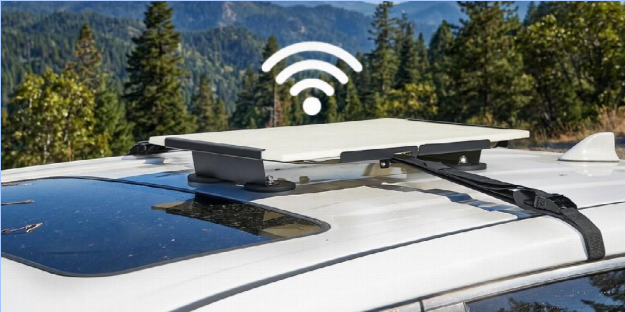
Exterior mounting, usually on the roof, rack, or a crossbar, gives the dish a better view of the sky. It also frees up cabin space. But it means thinking about wind, rain, trail debris, low branches, and parking-garage clearance. It also means running a cable from the outside into the vehicle, which needs to be done carefully.
For a truck or SUV that sees real trail time, I lean toward an exterior position for camp use, while keeping the option to bring the dish inside when it’s not needed.
A Starlink vehicle mount isn’t just a place to set the dish. It’s what keeps the equipment steady, protected, and in the right position. These are the points I’d weigh before buying anything:
When comparing options, it helps to look at both vehicle-specific brackets and more versatile designs. Choosing the right Starlink car mount is mostly about matching the installation method to the vehicle, whether the setup involves a pickup truck, an SUV, or a heavily modified off-road build. Also check which Starlink hardware a mount is designed for, since mounting interfaces differ between the Mini and the standard dishes, and one bracket won’t necessarily fit them all.
Different vehicles raise different questions. On a Starlink for truck setup, the roof of the cab is small, so many owners look at a bed rack or a cab-height rack instead. On an SUV, factory roof rails and aftermarket crossbars are common, and the key question is whether the mount works with what’s already there. A Jeep Wrangler has its own quirks, with a hardtop or soft top, a roll bar, and limited roof hardware, so the available mounting points can be more restrictive.
If there’s already a rack, a rooftop tent, an awning, or an antenna on the vehicle, a Starlink roof mount has to share that space. I’d measure the available room, check the dish’s clearance from other gear, and make sure nothing blocks its view. It’s also worth thinking about how the dish moves when the rest of the roof setup is folded, opened, or loaded.
The dish is only one piece. A setup that works in the driveway can fall apart at camp if the power, cables, or storage haven’t been thought through.
Starlink hardware draws real power, and power use varies by model, so I’d check the specs for the exact hardware before planning. That drives decisions about vehicle power management: a portable power station, a second battery, an inverter, or a 12V connection. Running the dish all day on a starter battery isn’t something I’d want to do. Ideally, the power source can handle the load without leaving the truck unable to start in the morning.
If the setup pulls from a power station, it helps to know how long it’ll realistically last and whether it needs to share with a fridge, lights, or laptops. Having a plan for recharging, whether by driving, solar, or a hookup, matters more than the exact numbers on paper.
Cable management gets ignored until something snags or pulls loose. I’d plan the cable path before the first trip: where it exits the vehicle, how it’s protected from rubbing or pinching, and how it stays out of the way of doors, tailgates, and roof gear. Strain relief and a bit of slack go a long way, as does keeping the router somewhere that’s easy to reach and doesn’t overheat.
Satellite gear isn’t cheap, and a rooftop mount in a trailhead parking lot is a visible target. I’d want to know what can be locked down, what can come off quickly, and where the removable parts go when I’m away from the vehicle. A padded case or a dedicated bin in the truck keeps the dish from rattling around when it’s not in use.
For drivers planning a more organized vehicle camping setup, brands such as Joytutus offer a range of automotive travel accessories that can complement different truck and SUV configurations. It’s worth looking at how the whole truck camping setup fits together, from roof rack accessories to storage, rather than treating each piece as a separate purchase.
Before heading out, I’d run through a checklist:
One more thing deserves saying plainly: satellite internet is a convenience, not a safety net. It doesn’t replace a satellite messenger, a personal locator beacon, or a proper emergency plan. If I’m heading somewhere genuinely remote, those tools come first, and Starlink is an extra.
Staying connected on the road isn’t about being online all the time. It’s about having the option when you need it, whether that’s checking a forecast before a pass, sending a message home, or handling something work-related without cutting a trip short. Starlink can be part of that picture, but only if the practical details are sorted out first.
For me, those details come down to three things: a mounting plan that suits the vehicle, a power setup that can carry the load, and a tidy way to route and protect everything. Get those right, and the technology mostly stays out of the way, which is how I’d want it on any trip.