Physical Address
304 North Cardinal St.
Dorchester Center, MA 02124
Physical Address
304 North Cardinal St.
Dorchester Center, MA 02124

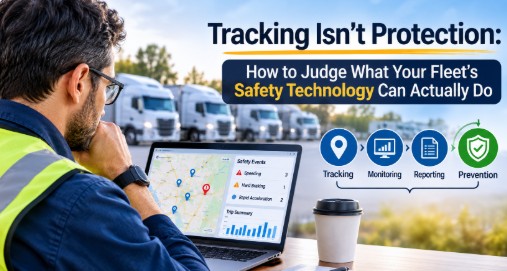
A fleet manager opens a dashboard showing every truck on a live map, a weekly summary of speeding events, and a clean trip log for each route. Then a driver leaves the yard in no condition to drive, and none of that data changes the outcome. The dashboard was accurate. It just wasn’t built to intervene.
That gap is why choosing driver safety software takes more care than comparing feature lists. Some platforms locate vehicles. Some record events. Some notify managers. A smaller group acts inside the vehicle before a risk turns into a crash. Knowing which kind you are buying is the most important step in the process, and vendors rarely spell it out.
Marketing pages blur the vocabulary, so it helps to separate the terms before evaluating anything.
None of these is better than the others in every situation. Reports matter for audits and trend analysis, and tracking helps with dispatch and recovery. But a platform strong in the first three can still do very little about a risk that develops in the moments before a trip starts.
Visibility tells you something happened or is happening. Whether it changes anything depends on who sees it, how fast, and what they can do about it.
Consider the regulatory example most commercial fleets already live with. The Federal Motor Carrier Safety Administration describes the primary purpose of electronic logging devices as letting authorized safety officials review hours-of-service data quickly and accurately. That is a compliance record, and a useful one. It is not a control that stops a tired or impaired person from driving. Treating a compliance tool as a safety tool is an easy mistake to make.
The scale of the underlying risks is worth keeping in view. According to NHTSA, 3,275 people were killed in distraction-affected crashes in 2023, about 8% of that year’s 40,901 traffic fatalities, as detailed in its Distracted Driving in 2023 research note. In a separate NHTSA analysis of alcohol-impaired driving, crashes involving an alcohol-impaired driver accounted for 12,429 fatalities, or 30 percent of all U.S. traffic deaths that year. These are national figures across all drivers, not fleet-specific numbers. They do show that the causes differ, and that a tool built for one is not automatically built for another.
Before looking at any demo, write down where your incidents and near-misses are most likely to come from. The answer shapes which capabilities are worth paying for.
Take a regional beverage distributor running early-morning routes. Its biggest concerns might be fatigue, fitness to drive at shift start, and hours-of-service pressure. A mobile service company with technicians on phones all day faces a different problem, such as distraction while navigating between jobs. A construction firm with shared pickups and informal vehicle assignments may mainly need to know who is driving what, and when.
Those three businesses need different things from the same product category. A solution that excels at route replay does little for the first, and one focused on phone use does little for the third. Mapping your actual exposure first keeps you from judging every platform against the same generic checklist.
This is also where the broader field of driving safety technology becomes easier to navigate. Once you know whether your priority is stopping a risky start, flagging a risky event, or documenting an incident for review, the vendors that fit your situation sort themselves out quickly.
“Detects risky driving” is not a specification. Press for specifics in three areas.
Ask which events or conditions the platform recognizes, and what hardware or sensor produces that signal. Some capabilities come from a smartphone, some from a device plugged into the vehicle, and some from a sensor installed in the cab. Each has different accuracy and different blind spots. A phone-based approach, for example, can only reflect what the phone can sense.
Then ask the reverse question: what does the platform not detect? A vendor that can answer that clearly is easier to trust than one that says “everything.”
Timing separates prevention from reporting. A system that flags an event during a drive gives a manager a chance to respond. A system that summarizes it the next morning gives them something to discuss. A control that acts before the vehicle moves is a different category again. None of these is wrong, but they are not interchangeable, and your risk profile should decide which timing matters most.
Every alert depends on a person. If a notification goes to a dispatcher who is already managing thirty routes, what is the realistic response time? If a driver can bypass a control without anyone knowing, how much protection does it provide? Ask vendors to walk through a realistic scenario end to end, from detection to outcome, rather than describing features in isolation.
More alerts do not mean more safety. A feed full of low-priority notifications teaches managers to stop reading them, and the one that matters gets lost in the volume.
During a trial, look at how alerts are configured. Can you set thresholds that match your operation? Can you separate urgent events from informational ones? Can different roles receive different notifications? Ask a current customer of similar size how many alerts a manager receives on an ordinary day, and how many lead to action.
Trip information and safety reports deserve the same scrutiny. Good reporting makes patterns visible, such as a depot with repeated problems or a route that consistently runs long. Weak reporting produces dense exports no one reads. Ask to see sample reports built from realistic data, and decide whether your operations team would actually use them.
Safety platforms are often priced in tiers, and the top tier is built to look complete. Before signing, run a simple check.
Be equally cautious with claims that sound universal. Driver safety software is not a single product category with a standard feature set. Two platforms using the same label can offer very different things, so verify each capability in writing or in a live demonstration rather than assuming.
A sound evaluation comes down to five questions. What risks matter most to your operation? Does the platform track, monitor, report, or prevent, and which of those do you actually need? What exactly can it detect, and how? Who acts on the information, and how quickly? And what are you paying for that you will never use?
Vendors that answer these plainly, including where their product stops, deserve more of your time than those that lead with a long feature grid. Some tools, such as My Drive Guardian, which pairs vehicle location with pre-start alcohol detection and ignition protection, are built around prevention rather than reporting alone. Others are designed mainly for visibility and documentation. Neither approach is universally right. The right choice is the one that closes a real gap in your operation, and you can only see that gap if you ask what the technology does and does not do.